After installing progressive web apps on KDE, the icons don’t appear correctly in the task bar, like this:
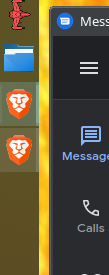
That second app is Google Messages. This gets confusing, especially if you have applications grouped (which is the default option in Manjaro KDE). The fix is pretty simple and the solution is completely from here. I’m documenting it here, just in case.
First, you need xdotool. This can be installed in Manjaro like this
sudo pacman -S xdotool
Next you need to browse to ~/.local/share/applications/
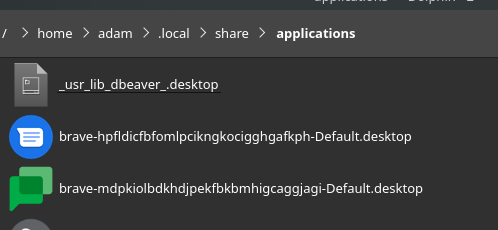
It’s pretty easy to tell which desktop file is which, thanks to them having the appropriate icon.
Last step is to edit the Exec= line of the desktop file by appending this text:
; xdotool search --sync --classname <value> set_window --class <value>
Make sure to replace <value> with the value in the StartupWMClass line. It should look like this when you are done:
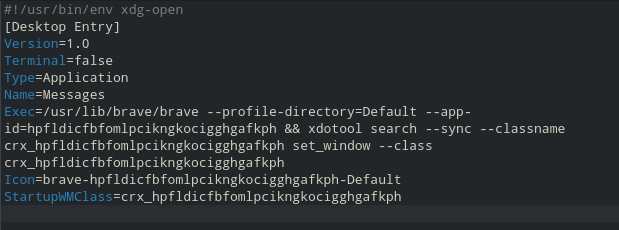
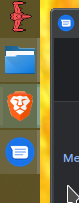
Save the file, kill the app, and restart it. It may take a second or two, but it should do the trick.
EDIT
If you are using brave, the path has changed from /usr/lib/brave/brave to /usr/lib/brave-browser/brave
Edit 2
I switched from && xdotool to ; xdotool
They both should work, but a semicolon should guarantee it runs.

Hello!
Unfortunately `xdotool` is said not be working on Wayland, however, Google Chrome is still using X11 as Ozone Platform, at least the flatpak version, so I have tried out installing and using the solution from above.
The results are mixed:
* if I start Google Chrome first and the PWA second, KDE will regroup the PWA with Chrome
* if I start the PWA first and Chrome second, no grouping happens
I also tried adding the same `xdotools` command to the Google Chrome .desktop file, but it did not do much difference.
I have checked the WM_CLASS values using `xprop` and it was set as al I played around. Interesting thing is that there are always 2 values for WM_CLASS. With `xdotool` running, both these values are set the same and even if Chrome and PWA does not share any of these values, the PWA will be regrouped under Chrome if started after starting Chrome.
——————————
I am on openSUSE Tumbleweed, running KDE 6, so I figured, I should try setting Google Chrome to run Wayland as Ozone Platform, so I loaded “chrome://flags/” and set “Preferred Ozone platform” to “Auto” and verified with the value of “Ozone Platform” to be “Wayland” on “chrome://gpu/” . If not, set it to “Wayland”.
The `xdotool` command will not work anymore, but it seems that it is enough to have a different “StartupWMClass” set in the .desktop files for both the PWA and Google Chrome to work separately.
The PWA already had one set to: `crx_[app-id]`, so I only had to create one for Google Chrome and set it to: ‘google-chrome’.
For now, both of them work fine using Wayland as Ozone platform, hopefully nothing major will appear in the future.
Thank you this was driving me absolutely bananas!!!!!